TouchGraph Navigator 2, Welcome!
Licensing and Support
Samples Licensing
Installation
System Requirements
Navigator Web Installation
Applet Launcher Page
TouchGraph Navigator Overview
Menus
File Menu
Export Data dialog
Export Image dialog
Add Search Entity dialog
Settings Menu
Edit Menu
View Menu
Tools Menu
Help Menu
Definitions
Navigator 2: New Features
Loading Wizard
Select Input
Excel
CSV / TSV
MCSV
Navigator DB API
NavigatorDbApi Script
MySQL
Data Types & Delimiters
Entities & Relations
Choose A Table
Edit Entity
Edit Relation
Dynamic Relations
Co-occurrences
Dynamic Attributes
Aliases
Settings
Names - Types / Attributes
Names - Entity Labels
Filter - Inclusion
Filter - Attribute Filters
Add Filter Dialog
Node - Colors
Node - Label / Image
Node - Halo Size / Shape
Node - Node Tags
Edge - Colors
Edge - Width / Pattern
Edge - Tags / Arrows
Graph Layout
Graph Panel
Nodes, Edges
Graph Interaction
Connected Components
Zooming, Spacing
Graph Toolbar
Color Chooser Dialog
Cluster Dialog and Algorithm
< Previous page Next page >

Edge Appearance - Tags / Arrows

Edge - Tags / Arrows
 
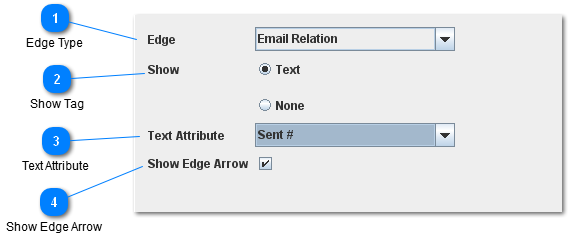
The Edge Appearance - Node Tags settings controls the text tags and arrows that can be shown in the middle of edges.
 
1

Edge Type

 
This dropdown shows which edge type the rest of the settings below apply to.
  • Selecting an edge in the graph or the tables while the setting dialog is visible will change this dropdown to show the selected edge type.
[Top]
2

Show Tag


There are 2 options for what the edge tag can show:
 
  • Text: Show the text value associated with the text attribute.
  • None: Don't show node a tag for this node type.
 
[Top]
3

Text Attribute

 
The Text Attribute determines the value that will be displayed on the edge's text tag.
[Top]
4

Show Edge Arrow


This option is only visible for directed edges.  When the show edge arrow check box is unselected, directed edges will not show arrows.
[Top]